

TikTok has rapidly emerged as a powerhouse platform for social media marketing, with its engaging content and vast userbase offering unparalleled opportunities for brands to connect with their target audience. If you’re ready to tap into the potential of TikTok advertising, you’ve come to the right place. In this comprehensive guide, we’ll walk you through the process of creating TikTok ads from start to finish.
Step 1: Create a TikTok Business Center Account
To get started with TikTok advertising, you’ll first need to create a TikTok Business Center account. Simply visit https://business.tiktok.com/ and follow the prompts to set up your account. This will serve as your central hub for managing your advertising campaigns and accessing valuable insights about your audience.
Step 2: Create an Advertiser Account
Once you’ve set up your TikTok Business Center account, you’ll need to create an advertiser account. This will allow you to access TikTok’s advertising platform and create and manage your ad campaigns. Follow the instructions provided to set up your advertiser account and complete the necessary registration steps.
Step 3: Connect Your TikTok App with Your Website
To maximize the effectiveness of your TikTok ads, it’s essential to connect your TikTok app with your website. This allows you to track user interactions and conversions, providing valuable data to optimize your campaigns. Depending on your e-commerce platform, you can use plugins like TikTok for Shopify (https://apps.shopify.com/tiktok) or TikTok for WooCommerce (https://woo.com/products/tiktok-for-woocommerce/) to seamlessly integrate TikTok with your website.
Step 4: Set Up Billing
Before you can start running ads on TikTok, you’ll need to set up billing for your advertiser account. You can choose to load your billing manually or set it to automatic billing, depending on your preference and budgeting needs.
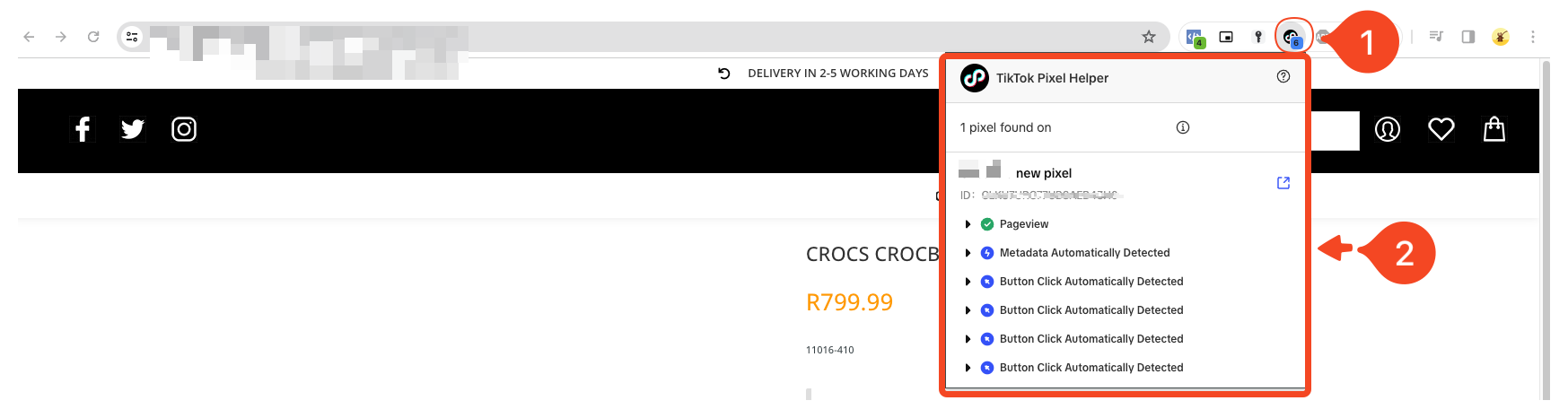
Step 5: Ensure Pixel Setup on Your Website
To track user behavior and conversions effectively, it’s crucial to ensure that the TikTok pixel is correctly set up on your website. We highly recommend downloading the TikTok Pixel Helper extension for Chrome (https://chromewebstore.google.com/detail/tiktok-pixel-helper/aelgobmabdmlfmiblddjfnjodalhidnn), which allows you to verify that the tracking pixel is functioning correctly.This tool provides valuable insights into the performance of your TikTok ads and helps you identify any issues with tracking.
Stay Tuned for the Next Blog
In our next blog post, we’ll dive into the nitty-gritty of creating TikTok ads, including tips for crafting compelling ad creative and targeting the right audience. Stay tuned for more valuable insights and actionable strategies to help you make the most of TikTok advertising.
Get in Touch for Expert Assistance
If you’re looking to create highly profitable TikTok ads but need assistance, don’t hesitate to reach out to us. Our team of experts is here to help you navigate the world of TikTok advertising and create campaigns that drive results. Get in touch with us today to learn more!
https://shorturl.fm/m6u3a
https://shorturl.fm/v5dBh